Saturday, 16 February 2013

id vs NSObject


There's often confusion about the difference between the following three declarations in Objective-C:

  1. id foo1; -> It simply declares a pointer to some Objective-C object, If you don't want (or can't have) any type checking, then use  id.

    if you do want compile-time type checking, you must decide between the second and third cases..
  2. NSObject *foo2; -> declaring a generic pointer of type NSObject*

  3. id<NSObject> foo3; -> pointer to any object that behaves like an NSObjec , "foo3 is a pointer to an object of any type that behaves like an NSObject" , (you really don't care what class the object is, you only care that it behaves like an NSObject.)

The first one is the most common. It simply declares a pointer to some Objective-C object (see /usr/include/objc/objc.h). id gives the compiler no information about the actual type of the object, so the compiler cannot do compile-time type checking for you. Thus, the compiler will let you send any (*) message to objects declared id. Actually, this is why the common idiom of [[Foo alloc] init] doesn't cause the compiler to complain. +alloc is declared to return type id, so the compiler won't yell when you then send the returned object the message init (or even initWithMyFoo:blah).

So, objects declared using id are just dynamically typed at runtime. The compiler has no useful information about the object's real type, so it can't warn you if you send it a message that it may not respond to.

Just because we know that an id is an Objective-C object does not mean that it points to an object that derives from NSObject, or that it even has common methods like retain and release. One solution is to statically type our variable using NSObject* as shown in number 2 above. This gives the compiler information about the class of the object pointed to by foo2 so the compiler can warn if you send a message to foo2 that an NSObject doesn't respond to. This means you can safely call retain, release, description, etc., but the compiler will warn if you call length or count or anything that an NSObject doesn't respond to.

So, declaring a generic pointer of type NSObject* is very similar to what you would do in other languages, like Java, but it's really a bit too restrictive for a language as flexible as Objective-C. Despite what you may have learned at one point, not all Foundation/Cocoa objects derive from NSObject. As an example, NSProxy is not derived from NSObject, so the foo2 pointer above would not be able to hold an NSProxy subclass, even though NSProxy does implement common methods like retain and release. What you really want is a pointer to any object that behaves like an NSObject. And that's exactly what the third case does.

Declaring an object as id<NSObject> tells the compiler that you don't care what type the object is, but you do care that it conforms to the specified NSObject protocol**. The compiler will ensure that all objects you assign to that pointer conform to the required protocol. A pointer typed like this can safely hold any NSObject (because NSObject conforms to the NSObject protocol), but it could also hold any NSProxy, because NSProxy also conforms to the NSObject protocol. In english, the declaration id<NSObject> foo3; says "foo3 is a pointer to an object of any type that behaves like an NSObject". This is very powerful, convenient, and expressive. In reality, we often don't care what type an object is, we just care that it responds to the messages that we want to send it (e.g., retain, release). 

So how do you decide which form you want to use? It's pretty easy. If you don't want (or can't have) any type checking, then use a plain id. This is very common for return types on methods that don't know the type of object they're returning (e.g., +alloc). It is also common to declare delegates to be type id, because delegates are generally checked at runtime with respondsToSelector:, and they usually aren't retained. 

However, if you do want compile-time type checking, you must decide between the second and third cases. Well, let me just help you out—you want the third case! :-) I've very, very, VERY rarely seen a situation where NSObject * worked but id<NSObject>would not. And using the protocol form has the advantage that it will work with NSProxys. You may think that you never use NSProxys, but Cocoa's distributed objects system makes heavy use of NSProxy subclasses. Additionally, the common case is that you simply want to ensure that an object can be retained or released, and in that case the protocol form conveys that intent better; you really don't care what class the object is, you only care that it behaves like an NSObject.


* Well, not "any" message. If you send a message using a selector that the compiler has never seen, it may warn that it has never seen that selector. This is nice in the event that you mistype init as inti.

** Now, when I say "NSObject" here I'm talking about the protocol (@protocol) named NSObject. There is also a class named NSObject that does indeed conform to the NSObject protocol, but they are two different things.

Blog link

Explanation of strong and weak.


Strong: "keep this in the heap until I don't point to it anymore"
Weak: "keep this as long as someone else points to it strongly"

Difference

The difference is that an object will be deallocated as soon as there are no strong pointers to it. Even if weak pointers point to it, once the last strong pointer is gone, the object will be deallocated, and all remaining weak pointers will be zeroed out.
A weak reference does not extend the lifetime of the object it points to, and automatically becomes nil when there are no strong references to the object.

Note
Under ARC, strong is the default for object types.

Consider an example.
Imagine our object is a dog, and that the dog wants to run away (be deallocated).
Strong pointers are like a leash on the dog. As long as you have the leash attached to the dog, the dog will not run away. If five people attach their leash to one dog, (five strong pointers to one object), then the dog will not run away until all five leashes are detached.
Weak pointers, on the other hand, are like little kids pointing at the dog and saying "Look! A dog!" As long as the dog is still on the leash, the little kids can still see the dog, and they'll still point to it. As soon as all the leashes are detached, though, the dog runs away no matter how many little kids are pointing to it.
As soon as the last strong pointer (leash) no longer points to an object, the object will be deallocated, 


Transitioning to ARC Release Notes

Variable Qualifiers

You use the following lifetime qualifiers for variables just like you would, say, const.
__strong
__weak
__unsafe_unretained
__autoreleasing
  • __strong is the default. An object remains “alive” as long as there is a strong pointer to it.
  • __weak specifies a reference that does not keep the referenced object alive. A weak reference is set to nil when there are no strong references to the object.
  • __unsafe_unretained specifies a reference that does not keep the referenced object alive and is not set to nil when there are no strong references to the object. If the object it references is deallocated, the pointer is left dangling.
  • __autoreleasing is used to denote arguments that are passed by reference (id *) and are autoreleased on return.
You should decorate variables correctly. When using qualifiers in an object variable declaration, the correct format is:
ClassName * qualifier variableName;
for example:
MyClass * __weak myWeakReference;
MyClass * __unsafe_unretained myUnsafeReference;
Other variants are technically incorrect but are “forgiven” by the compiler. To understand the issue, see http://cdecl.org/.
Take care when using __weak variables on the stack. Consider the following example:
NSString * __weak string = [[NSString alloc] initWithFormat:@"First Name: %@", [self firstName]];
NSLog(@"string: %@", string);
Although string is used after the initial assignment, there is no other strong reference to the string object at the time of assignment; it is therefore immediately deallocated. The log statement shows that string has a null value. (The compiler provides a warning in this situation.)
You also need to take care with objects passed by reference. The following code will work:
NSError *error;
BOOL OK = [myObject performOperationWithError:&error];
if (!OK) {
    // Report the error.
    // ...
However, the error declaration is implicitly:
NSError * __strong e;
and the method declaration would typically be:
-(BOOL)performOperationWithError:(NSError * __autoreleasing *)error;
The compiler therefore rewrites the code:
NSError * __strong error;
NSError * __autoreleasing tmp = error;
BOOL OK = [myObject performOperationWithError:&tmp];
error = tmp;
if (!OK) {
    // Report the error.
    // ...
The mismatch between the local variable declaration (__strong) and the parameter (__autoreleasing) causes the compiler to create the temporary variable. You can get the original pointer by declaring the parameter id __strong * when you take the address of a __strong variable. Alternatively you can declare the variable as __autoreleasing.


and all weak pointers will be zeroed out.


ARC Uses a New Statement to Manage Autorelease Pools


Using ARC, you cannot manage autorelease pools directly using the NSAutoreleasePool class. Instead, you use @autoreleasepool blocks:
@autoreleasepool {
     // Code, such as a loop that creates a large number of temporary objects.
}
This simple structure allows the compiler to reason about the reference count state. On entry, an autorelease pool is pushed. On normal exit (break, return, goto, fall-through, and so on) the autorelease pool is popped. For compatibility with existing code, if exit is due to an exception, the autorelease pool is not popped.
This syntax is available in all Objective-C modes. It is more efficient than using the NSAutoreleasePool class; you are therefore encouraged to adopt it in place of using the NSAutoreleasePool.


Stack Variables Are Initialized with nil

Using ARC, strong, weak, and autoreleasing stack variables are now implicitly initialized with nil. For example:
- (void)myMethod {
    NSString *name;
    NSLog(@"name: %@", name);
}
will log null for the value of name rather than perhaps crashing.

Use Compiler Flags to Enable and Disable ARC


ARC is supported in Xcode 4.2 and later OS X v10.6 and later (64-bit applications) and for iOS 4 and later. Weak references are not supported in OS X v10.6 and iOS 4. There is no ARC support in Xcode 4.1 and earlier.

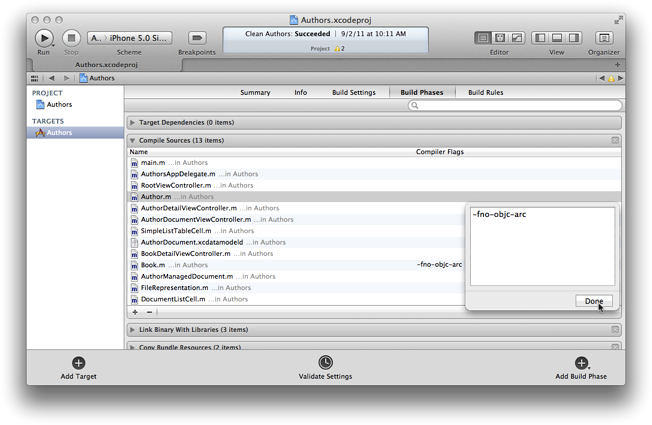
Enable ARC -> -fobjc-arc
Disable ARC -> -fno-objc-arc

Project -> Build Phases -> Compiler Sources -> Set Compiler flag for particular file.

You enable ARC using a new -fobjc-arc compiler flag. You can also choose to use ARC on a per-file basis if it’s more convenient for you to use manual reference counting for some files.
 For projects that employ ARC as the default approach, you can disable ARC for a specific file using a new -fno-objc-arc compiler flag for that file.


Basic Memory Management Rules

The memory management model is based on object ownership. Any object may have one or more owners. As long as an object has at least one owner, it continues to exist. If an object has no owners, the runtime system destroys it automatically. To make sure it is clear when you own an object and when you do not, Cocoa sets the following policy:
  • You own any object you create
    You create an object using a method whose name begins with “alloc”, “new”, “copy”, or “mutableCopy” (for example, alloc, newObject, or mutableCopy).
  • You can take ownership of an object using retain
    A received object is normally guaranteed to remain valid within the method it was received in, and that method may also safely return the object to its invoker. You use retain in two situations: (1) In the implementation of an accessor method or an init method, to take ownership of an object you want to store as a property value; and (2) To prevent an object from being invalidated as a side-effect of some other operation (as explained in “Avoid Causing Deallocation of Objects You’re Using”).
  • When you no longer need it, you must relinquish ownership of an object you own
    You relinquish ownership of an object by sending it a release message or an autorelease message. In Cocoa terminology, relinquishing ownership of an object is therefore typically referred to as “releasing” an object.
  • You must not relinquish ownership of an object you do not own
    This is just corollary of the previous policy rules, stated explicitly.


Beginning ARC in iOS 5 Tutorial Part 1

Age between two dates for age calculator


NSCalendar *sysCalendar = [NSCalendar currentCalendar];
    unsigned int unitFlags = NSHourCalendarUnit | NSMinuteCalendarUnit | NSDayCalendarUnit | NSMonthCalendarUnit;
    
    NSDateComponents *conversionInfo = [sysCalendar components:unitFlags fromDate:firstDate  toDate:secondDate  options:0];
    
    NSLog(@"Conversion: %dmin %dhours %ddays %dmoths %dYear",[conversionInfo minute], [conversionInfo hour], [conversionInfo day], [conversionInfo month]%12,[conversionInfo month]/12);
    NSString *result2 = [NSString stringWithFormat:@"%d year, %d month and %d day",[conversionInfo month]/12,[conversionInfo month]%12,[conversionInfo day]];

How to restrict alpha character in phone UITextField i.e only enter numeric character(0,1,2...9)

When you want user to enter only number (like in case of mobile number) then you can restrict using this

1. Put a macro before @implementation   

   #define NUMERIC @"1234567890"


2. textField DelegateMethod   
  
- (BOOL)textField:(UITextField *)textField shouldChangeCharactersInRange:(NSRange)range replacementString:(NSString *)string
{
    NSCharacterSet *unacceptedInput = nil;
    if(textField== self. phoneTextField)
    {
        unacceptedInput = [[NSCharacterSet characterSetWithCharactersInString:NUMERIC] invertedSet];
    }
    return ([[string componentsSeparatedByCharactersInSet:unacceptedInput] count] <= 1);
}
Note:Don't forgot connect textField delegate to fileowner

Tuesday, 5 February 2013

if create variable in AppDelegate and use any class

//....we write this code top of the class
#define appDel ((AppDelegate*)[UIApplication sharedApplication].delegate)
 
or
AppDelegate *appDelegate = (AppDelegate*) [[UIApplication sharedApplication] delegate];

Friday, 1 February 2013

how to hide the keyboard when empty area is touched on iphone


- (void)touchesBegan:(NSSet *)touches withEvent:(UIEvent *)event 
{
   [self.view endEditing:YES];
}